Power Query M code to create date table to cover most fiscal date related reporting needs
What

Most data models need a calendar table. The more the calendar table can do itself the simple and more efficient the DAX time related calculations will be. Some reporting needs in financial reporting include:
- Current Month, Current Quarter, YTD
- Previous Month, Previous Quarter, Previous Year
- Previous Year Before This Month
These and more date columns are included in the general calendar table code at the end of this post.
Theory
Power BI Power Query will update the calendar table and its logical parameters every time the data of the report is processed and updated. It is relatively easy to add your own date logic columns by taking example from the code at the end of this post or by Power Query Add Column functionality.
How
Just follow the STEPS below to create the calendar. After that, you can filter your data by selecting in the Power BI visualization view as filter e.g. YTD Previous Year “TRUE”. Or, for example, you can add date logic to almost any existing measure with the following DAX pattern:
CALCULATE(enter_measure_name; FILTER('calendar'; calendar[YTD Previous Year] = TRUE))
STEP 1: Open Power BI report, select Edit Queries –> New Source –> Blank Query
STEP 2: Select advanced editor from the top pane, remove any text if visible in the editor. Copy the code at the end of this post to the advanced editor. Press DONE button.
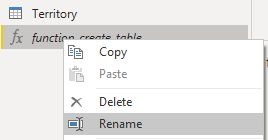
STEP 3: Rename the created function as “function_create_date_table” by clicking the function with right mouse button and select Rename (screenshot below)
STEP 4: Create another new blank query (New Source –> Blank Query). Select advanced editor, remove any text if visible in the editor. Copy this code to the advanced editor:
let
    Source = function_create_date_table(#date(2000,1,1),Date.From(Date.AddYears(DateTime.LocalNow(),10)))
in
    Source
Edit the date range to fit your needs. You can use for example a fixed date like #date(2000,1,1) or year range, like next 10 years compared to the current date:
Date.From(Date.AddYears(DateTime.LocalNow(),10))
Press DONE button.
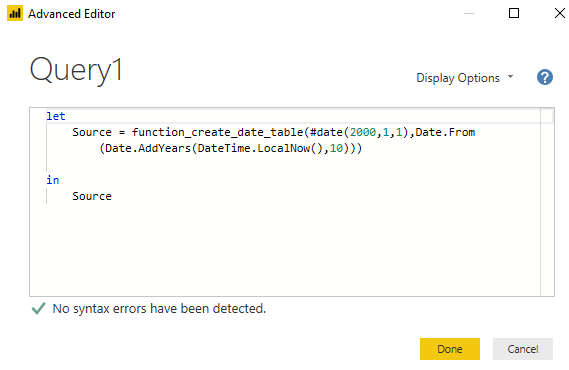
STEP 5: Rename the query as “Calendar” by clicking it with the right mouse button and select Rename
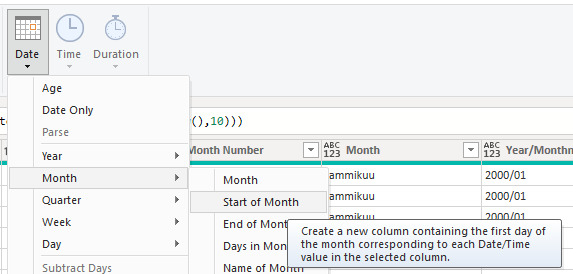
STEP 6: Add any date columns to the table you need, either by taking example from the code at the end of this post or by using Power Query Add column functionality, for example: Add Column -> Date -> Month -> Start of Month
STEP 7: Process your Power BI report (click Close and Apply) and link the calendar table to the rest of your data with Date or other custom column you have created to fit the formatting of your other date data. Typically, date calendar has one-to-many relationship with another table with filter direction to fact data (values of e.g. sales).
Now it is the time to make some date calculations with DAX. See my post: Power BI DAX How to Calculate and Filter Based on Dates.
Code
Power Query M code to create the calendar table
//Create Date Dimension
(StartDate as date, EndDate as date)=>

let
    //Capture the date range from the parameters
    StartDate = #date(Date.Year(StartDate), Date.Month(StartDate),
    Date.Day(StartDate)),
    EndDate = #date(Date.Year(EndDate), Date.Month(EndDate),
    Date.Day(EndDate)),

    //Get the number of dates that will be required for the table
    GetDateCount = Duration.Days(EndDate - StartDate)+1,

    //Take the count of dates and turn it into a list of dates
    GetDateList = List.Dates(StartDate, GetDateCount,
    #duration(1,0,0,0)),

    //Convert the list into a table
    DateListToTable = Table.FromList(GetDateList,
    Splitter.SplitByNothing(), {"Date"}, null, ExtraValues.Error),

    //Create various date attributes from the date column
    //Add Year Column
    YearNumber = Table.AddColumn(DateListToTable, "Year",
    each Date.Year([Date])),

    //Add Quarter Column
    QuarterNumber = Table.AddColumn(YearNumber , "Quarter",
    each "Q" & Number.ToText(Date.QuarterOfYear([Date]))),

    //Add Week Number Column
    WeekNumber= Table.AddColumn(QuarterNumber , "Week Number",
    each Date.WeekOfYear([Date])),

    //Add Month Number Column
    MonthNumber = Table.AddColumn(WeekNumber, "Month Number",
    each Date.Month([Date])),

    //Add Month Name Column
    MonthName = Table.AddColumn(MonthNumber , "Month",
    each Date.ToText([Date],"MMMM")),

    //Year/MonthNumber
    YearMonthnumber = Table.AddColumn(MonthName, "Year/Monthnumber",
    each if Date.Month([Date])>9 then Text.From(Date.Year([Date])) & "/" &
    Text.From(Date.Month([Date])) else Text.From(Date.Year([Date])) & "/0" &
    Text.From(Date.Month([Date]))),


    //Add Day number of Month
    InsertDay = Table.AddColumn(YearMonthnumber, "Day Of Month",
    each Date.Day([Date])),

    //Add Day of Week Column
    DayOfWeek = Table.AddColumn(InsertDay , "Day of Week",
    each Date.ToText([Date],"dddd")),

    //Day of Week Number
    DayOfWeekNumber = Table.AddColumn(DayOfWeek , "Day of Week Number",
    each Date.DayOfWeek([Date])),

    //Current Month
    CurrentMonth = Table.AddColumn(DayOfWeekNumber, "Current Month",
    each Date.IsInCurrentMonth([Date])),

    //Previous Month
    PreviousMonth = Table.AddColumn(CurrentMonth, "Previous Month",
    each Date.IsInPreviousMonth([Date])),

    //Current Quarter
    CurrentQuarter = Table.AddColumn(PreviousMonth, "Current Quarter",
    each Date.IsInCurrentQuarter([Date])),

    //Previous Quarter
    PreviousQuarter = Table.AddColumn(CurrentQuarter, "Previous Quarter",
    each Date.IsInPreviousQuarter([Date])),

    //Current Year
    CurrentYear = Table.AddColumn(PreviousQuarter, "Current Year",
    each Date.IsInCurrentYear([Date])),

    //Previous Year
    PreviousYear = Table.AddColumn(CurrentYear, "Previous Year",
    each Date.IsInPreviousYear([Date])),


    //Current Year Before This Month
    CurrentYearBeforeThisMonth = Table.AddColumn(PreviousYear, "Current Year Before This Month",
    each if Date.Year([Date])=Date.Year(DateTime.LocalNow()) and Date.Month([Date])
    <Date.Month(DateTime.LocalNow()) then true else false),

    //Previous Year Before This Month
    PreviousYearBeforeThisMonth = Table.AddColumn(CurrentYearBeforeThisMonth, "Previous Year Before
    This Month",
    each if Date.Year([Date])=Date.Year(Date.AddYears(DateTime.LocalNow(),-1)) and
    Date.Month([Date])<Date.Month(DateTime.LocalNow()) then true else false),

    //YTD
    YTD = Table.AddColumn(PreviousYearBeforeThisMonth, "YTD",
    each Date.IsInYearToDate([Date])),

    //YTD Previous Year
    YTDPreviousYear = Table.AddColumn(YTD, "YTD Previous Year",
    each Date.IsInYearToDate(Date.AddYears([Date],1))),

    //MTD
    MTD = Table.AddColumn(YTDPreviousYear, "MTD",
    each if Date.Year([Date])=Date.Year(DateTime.LocalNow()) and
   Date.Month([Date])=Date.Month(DateTime.LocalNow()) and [Date]<=Date.From(DateTime.LocalNow())
   then true else false),

    //MTD Previous Month
    MTDPreviousMonth = Table.AddColumn(MTD, "MTD Previous Month",
    each if Date.Month([Date])>1 then if Date.Year([Date])=Date.Year(DateTime.LocalNow()) and
    Date.Month(Date.AddMonths([Date],1))=Date.Month(DateTime.LocalNow()) and Date.Day([Date])
    <=Date.Day(Date.From(DateTime.LocalNow())) then true else false else if
    Date.Year(Date.AddYears([Date],1))=Date.Year(DateTime.LocalNow()) and Date.Month([Date])=12 and
    Date.Day([Date])<=Date.Day(Date.From(DateTime.LocalNow())) then true else false),

    //Last 7 days
    Last7Days = Table.AddColumn(MTDPreviousMonth, "Last 7 Days",
    each if [Date]>Date.From(Date.AddDays(DateTime.LocalNow(),-7)) and [Date]
    <=Date.From(DateTime.LocalNow()) then "Last 7 Days" else null),

    //Last 30 days
    Last30Days = Table.AddColumn(Last7Days, "Last 30 Days",
    each if [Date]>Date.From(Date.AddDays(DateTime.LocalNow(),-30)) and [Date]
    <=Date.From(DateTime.LocalNow()) then "Last 30 Days" else null),

    //Last 90 days
    Last90Days = Table.AddColumn(Last30Days, "Last 90 Days",
    each if [Date]>Date.From(Date.AddDays(DateTime.LocalNow(),-90)) and [Date]
    <=Date.From(DateTime.LocalNow()) then "Last 90 Days" else null),

     //Last 365 days
    Last365Days = Table.AddColumn(Last90Days, "Last 365 Days",
    each if [Date]>Date.From(Date.AddDays(DateTime.LocalNow(),-365)) and [Date]
    <=Date.From(DateTime.LocalNow()) then "Last 365 Days" else null),

    //Date to date form
    datetransform = Table.TransformColumnTypes(Last365Days,{{"Date", type date}}),

    //Year to whole number
    yeartown = Table.TransformColumnTypes(datetransform,{{"Year", Int64.Type}}),

    //MonthNumber to whole number
    monthnumbertown = Table.TransformColumnTypes(yeartown,{{"Month Number", Int64.Type}}),

    //DayOfMonth to whole number
    dayofmonthtown = Table.TransformColumnTypes(monthnumbertown,{{"Day Of Month", Int64.Type}}),

     //WeekNumber to whole number
    weeknumbertown = Table.TransformColumnTypes(dayofmonthtown,{{"Week Number", Int64.Type}}),

     //Current Month to logical
    cmtl = Table.TransformColumnTypes(weeknumbertown,{{"Current Month", type logical}}),

     //Previous Month to logical
    pmtl = Table.TransformColumnTypes(cmtl,{{"Previous Month", type logical}}),

     //Current Quarter to logical
    cqtl = Table.TransformColumnTypes(pmtl,{{"Current Quarter", type logical}}),

     //Previous Quarter to logical
    pqtl = Table.TransformColumnTypes(cqtl,{{"Previous Quarter", type logical}}),

     //Current Year to logical
    cytl = Table.TransformColumnTypes(pqtl,{{"Current Year", type logical}}),

     //Previous Year to logical
    pytl = Table.TransformColumnTypes(cytl,{{"Previous Year", type logical}}),

     //Current Year Before This Month to locigal
    cybtmtl = Table.TransformColumnTypes(pytl,{{"Current Year Before This Month", type logical}}),

     //Previous Year Before This Month to locigal
    pybtmtl = Table.TransformColumnTypes(cybtmtl,{{"Previous Year Before This Month", type
    logical}}),

     //YTD to logical
    ytdtl = Table.TransformColumnTypes(pybtmtl,{{"YTD", type logical}}),

     //YTD Previous Year to logical
    ytdpytl = Table.TransformColumnTypes(ytdtl,{{"YTD Previous Year", type logical}}),

     //MTD to logical
    mtdtl = Table.TransformColumnTypes(ytdpytl,{{"MTD", type logical}}),

     //MTD Previous Month to logical
    mtdpmtl = Table.TransformColumnTypes(mtdtl,{{"MTD Previous Month", type logical}})


in
    mtdpmtl
Sample Power BI file
Calendar table is created in the Power Query Editor in the sample Power BI file: https://drive.google.com/file/d/1douXjNV-V8JVdhJb_M4czVR14uQ8fHR-/view?usp=sharing
Sample data source: https://www.learndax.com/power-bi-sample-data-for-beginners-to-download/